

Let’s start with a confession.
Most people think websites are built by caffeine-fueled developers typing mysterious green code on black screens like they’re hacking the Matrix.
Reality check: not anymore.
Today, most modern websites are powered by something far more user-friendly, scalable, and sanity-saving — a CMS.
So if you’ve ever wondered what is a CMS, why everyone from bloggers to billion-dollar brands uses one, and how it actually helps build websites without breaking your brain — you’re in the right place.
This is Thinkster-style clarity. Slightly quirky. Very practical. Zero fluff.
Let’s dive in.
What Is a CMS (Content Management System)
CMS stands for Content Management System.
In simple terms, a CMS is a software application that lets you create, edit, manage, and publish website content without needing to write code every single time.
Think of it like this:
- Your website is a house
- Code is the bricks, wiring, and plumbing
- A CMS is the remote control that lets you rearrange furniture without rebuilding the house
When someone asks, “What is a CMS?”, the smartest short answer is:
A CMS is the engine that powers a website’s content — text, images, pages, blogs, products — all from a simple dashboard.
Popular CMS examples include:
- WordPress
- Shopify
- Magento
- Drupal
- Contentful
- Strapi
And yes, Thinkster works with them all — because different businesses need different engines.
Types of CMS
Not all CMS platforms are built the same. Some are great for blogs, some for enterprises, some for futuristic apps, and some for selling products at 3 a.m. while you sleep.
Let’s break it down.
1. Web Content Management (WCM)
This is the most common type — and probably what most people imagine when asking what is a CMS.
Web Content Management systems focus on:
- Pages
- Blogs
- Media
- SEO-friendly content updates
WordPress is the poster child here.
Perfect for:
- Business websites
- Blogs
- Portfolio sites
- Service-based companies
At Thinkster, most custom website design projects start with a WCM because it balances flexibility with ease of use beautifully.
2. Enterprise Content Management (ECM)
Now we’re entering big-business territory.
ECMs are designed to handle:
- Massive volumes of documents
- Internal workflows
- Permissions and compliance
- Multi-department collaboration
Used by:
- Corporations
- Government bodies
- Large institutions
These systems are less about blogging and more about process control. Think less “publish a blog” and more “approve this document across five departments.”
3. Headless CMS
This is where things get a little spicy.
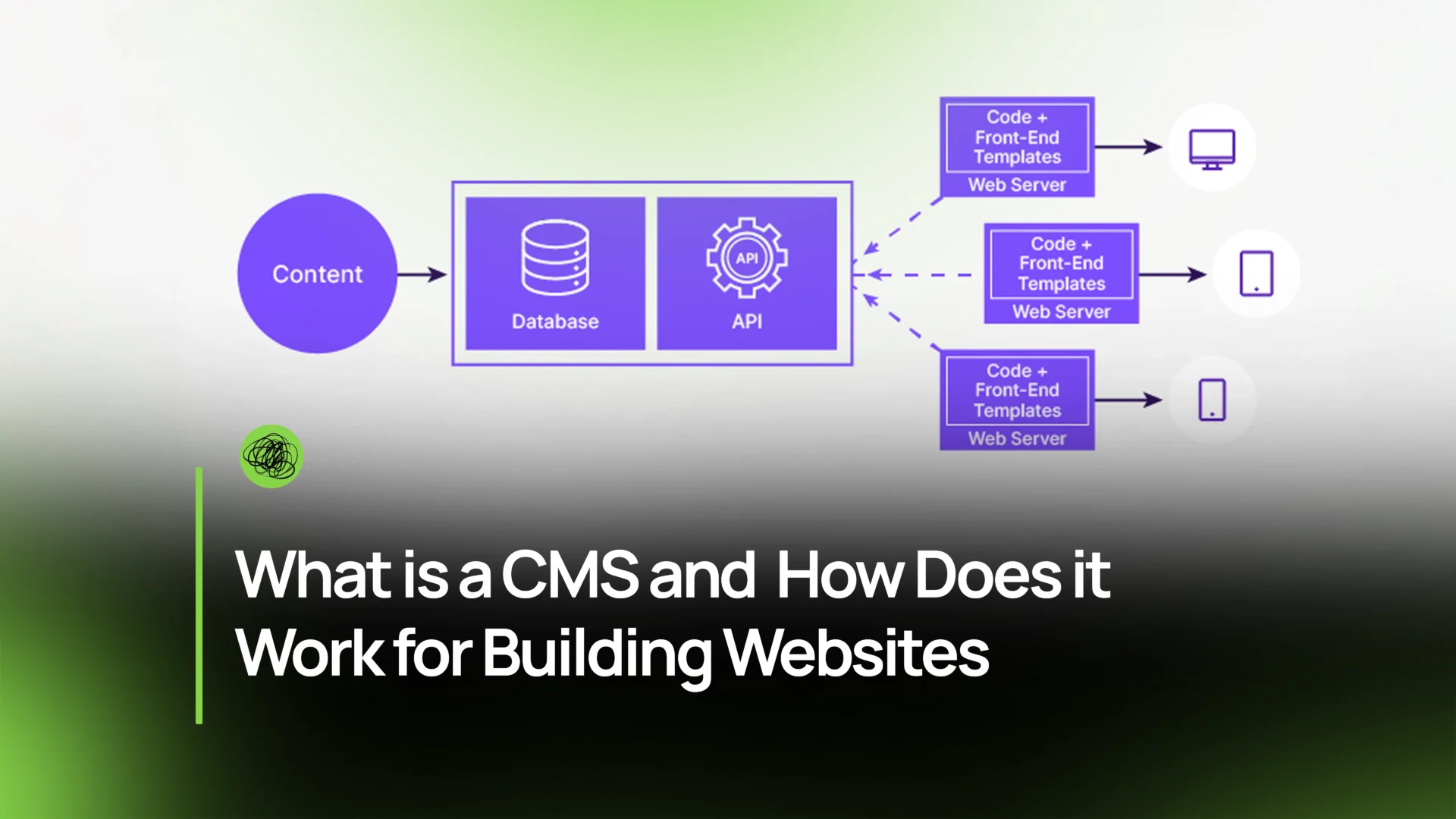
A headless CMS separates the backend (content storage) from the frontend (how it looks).
Translation:
- Content lives in one place
- It can appear on websites, apps, kiosks, or smart devices
Perfect for:
- Mobile apps
- Multi-platform products
- Custom digital ecosystems
If you’ve ever wondered how website development works for modern apps — headless CMS platforms are often the secret sauce.
4. E-commerce Platforms
These are CMS platforms built specifically to sell things.
Examples:
- Shopify
- Magento
- WooCommerce
They manage:
- Products
- Orders
- Payments
- Inventory
- Customer data
For ecommerce website development, a CMS isn’t optional — it’s foundational. At Thinkster, we design ecommerce CMS setups that scale from 10 orders a month to 10,000 without panic attacks.
Why Businesses Use a CMS
If CMS platforms didn’t make life easier, nobody would use them. But businesses love CMSs — and for good reason.
Here’s why.
Reduces Technical Barrier
You shouldn’t need to call a developer every time you want to:
- Change a heading
- Update pricing
- Add a new page
A CMS lets non-technical teams manage content confidently. Marketing teams stay agile. Founders stay sane.
Improves Efficiency
Time is money. CMSs save both.
- Faster updates
- Faster publishing
- Faster iterations
Whether you’re running campaigns or updating service pages, CMS-driven website development services are built for speed.
Enhances Collaboration
CMS platforms support:
- Multiple users
- Role-based access
- Approval workflows
Your writer writes.
Your designer designs.
Your admin approves.
No chaos. No overwritten files. Just clean teamwork.
Consistency
Brand consistency matters.
CMSs ensure:
- Uniform layouts
- Consistent fonts and colors
- Structured content
This is crucial when scaling websites or during website migration services, where content consistency can make or break SEO.
How a CMS Works for Building Websites
Now for the big one.
Let’s demystify how a CMS actually works.
No jargon. Just logic.
1. Content Creation & Editing
Inside a CMS, you get an editor — usually visual.
You can:
- Add text
- Upload images
- Embed videos
- Create pages or blog posts
It feels more like Google Docs than coding — and that’s the point.
2. Storage (Database)
Everything you create is stored in a database:
- Text
- Images
- Metadata
- SEO information
This structured storage is why CMS websites are easy to scale, migrate, and optimize.
3. Separation of Content & Design
This is one of the most powerful CMS features.
3.1 Templates / Themes
Design lives in templates:
- Page layouts
- Headers
- Footers
- Styling
This ensures your site looks consistent even when content changes.
3.2 Content Insertion
Your content automatically flows into these templates.
You write once — the CMS handles how it looks everywhere.
This separation is why custom website design works so well with CMS platforms.
4. Management & Collaboration
CMSs aren’t just content tools — they’re management systems.
4.1 Dashboard
The dashboard is your control room:
- Page list
- Media library
- SEO settings
- Analytics integrations
Everything in one place. No scavenger hunts.
4.2 User Roles
Admins, editors, authors, contributors — each role has defined permissions.
This is crucial for agencies like Thinkster managing multiple client websites efficiently.
5. Publishing
Once content is ready:
- Click “Publish”
- Schedule posts
- Update instantly
No FTP uploads. No midnight developer calls.
6. Customization
Here’s where CMS platforms shine.
You can:
- Add plugins
- Build custom modules
- Integrate CRMs
- Connect analytics tools
This flexibility is why CMS platforms power everything from startups to enterprise platforms.
Key Benefits for CMS Websites
Let’s summarize why CMS websites dominate the internet.
No Coding Needed
Yes, developers still matter — but daily updates don’t require them.
This empowers businesses to move fast.
Streamlined Workflow
From idea → content → publish → update → optimize — all inside one system.
CMSs are built for real-world workflows, not theory.
Collaboration
Teams grow. Websites scale. CMSs keep things organized.
This is especially important when businesses opt for long-term website development services rather than one-time builds.
Cost-Effective
CMS platforms reduce:
- Development time
- Maintenance costs
- Dependency on technical teams
Over time, they pay for themselves.
Conclusion
So, what is a CMS really?
It’s not just software.
It’s the backbone of modern websites.
A CMS:
- Makes websites manageable
- Keeps content flexible
- Allows businesses to scale
- Powers everything from blogs to ecommerce empires
And when implemented correctly — it becomes your website’s biggest growth enabler.
At Thinkster, we don’t just build CMS websites.
We design future-ready digital systems — optimized for performance, SEO, scalability, and real business goals.
Whether it’s ecommerce website development, custom website design, or complex website migration services, CMS platforms are at the heart of how website development works today.
FAQs
1. Is Canva a CMS?
No. Canva is a design tool, not a CMS.
It helps create visuals, but it doesn’t manage website content, databases, or publishing workflows.
2. What is CMS with example?
A CMS is a content management system like WordPress, which allows users to create, edit, and publish website content without coding.
3. Do I need a CMS for my website?
If you plan to:
- Update content regularly
- Scale your site
- Collaborate with a team
Then yes — a CMS is highly recommended.
4. What is the difference between a website builder and a CMS?
Website builders are simpler but limited.
CMS platforms offer more flexibility, scalability, and control.
For serious businesses, CMS wins every time.
5. Why choose Thinkster for building a CMS website?
Because we don’t just ask “what is a CMS?” — we ask:
- What does your business need?
- How will your site scale?
- What should your CMS enable 6 months from now?
Thinkster blends strategy, design, and technology to build CMS websites that don’t just exist — they perform.